Custom WordPress Theme for nicolereap.com — A Full Rebuild
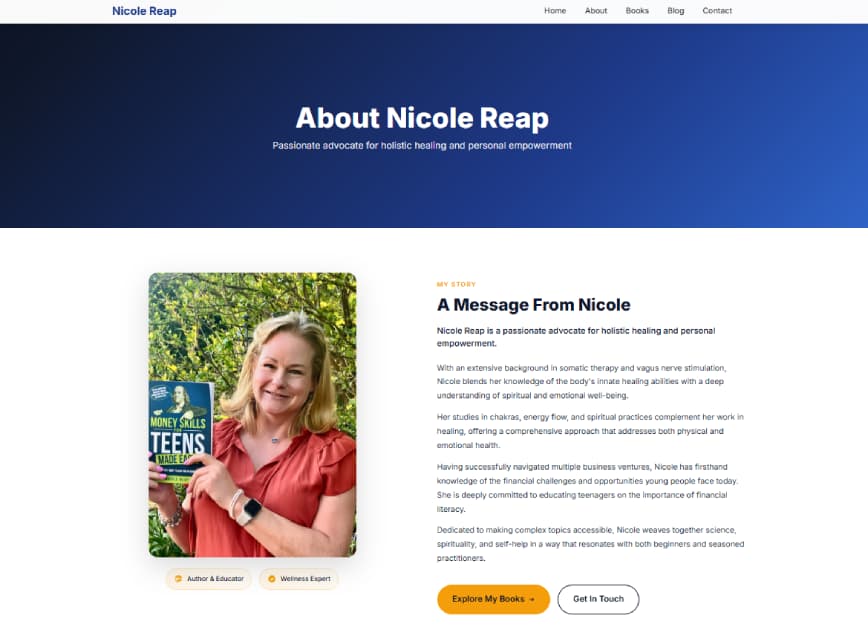
Nicole needed more than a template refresh — she needed a site built for her brand from scratch. Here's how I rebuilt nicolereap.com with a fully custom WordPress theme.
Custom WordPress Theme for nicolereap.com — A Full Rebuild
Nicole Reap didn't come to me asking for a fresh coat of paint on her old site. She needed something built for her — not a template tweaked until it sort of fit. So that's what we did: a full custom WordPress theme, built from scratch, designed around exactly how she works and what her audience needs to see.
Here's how the project came together and what the build actually involved.
What Was Wrong With the Original Site
The old nicolereap.com wasn't broken — it just wasn't working hard enough. The design felt generic, the navigation made visitors think too much before finding anything, and Nicole had basically no control over her own content without touching code or calling someone.
That last part matters a lot. A site you're afraid to update is a site that goes stale. The goal from day one was to fix the design and hand Nicole a backend she could actually use.
Why a Custom WordPress Theme and Not a Page Builder
The short answer: page builders like Elementor or Divi would have given us speed up front and problems later. Bloated output, CSS conflicts, markup that's difficult to maintain — for a personal brand site that Nicole needs to own long-term, that trade-off isn't worth it.
A custom theme built on WordPress's native template hierarchy gave us complete control: clean semantic HTML, only the scripts and styles the site actually needs, and a performance baseline that doesn't degrade every time a plugin updates. It's more work at the start, but it's the right call for a site that needs to last.
The Build — What Actually Went Into It
The theme was built on a clean PHP foundation using WordPress's template hierarchy — no framework dependencies, no builder overhead. Custom post types were registered natively in PHP to keep the admin interface clean and intuitive for Nicole.
For content management, I used Advanced Custom Fields (ACF) to give Nicole editable fields for the parts of the site she'd actually want to update — without exposing anything that could break the layout. The result is a backend where she can update her portfolio, add content, and manage her pages without needing to call me every time.
Performance was treated as a requirement, not an afterthought:
- Images served in WebP with proper width/height attributes to prevent layout shift
- No jQuery — everything written in vanilla JS
- CSS written by hand — no utility framework loading hundreds of unused classes
- Scripts deferred where render-blocking wasn't needed
Design That's Actually Specific to Nicole
The design decisions weren't arbitrary. Nicole's brand has a clear personality — approachable, credible, warm — and the site needed to reflect that without being generic "professional" beige. The typography hierarchy, spacing, and color palette were all chosen to match that tone and guide visitors toward the parts of the site that matter most.
Mobile was treated as a first-class experience, not a scaled-down version of the desktop design. Nicole's audience isn't exclusively desktop, and the layout holds up properly at every breakpoint.
The Handoff
The finished site gave Nicole something she didn't have before: a web presence that actually represents her work, loads fast, and doesn't require a developer every time she wants to make a change. The custom backend controls mean she can keep the content current herself — which is the point.
If you're running a personal brand or small business and your current site is holding you back — template constraints, slow load times, a backend that intimidates you — a custom WordPress build is worth looking at seriously. Get in touch and let's talk about what your site actually needs.